
AI Agent Regression Testing: How to Ship Prompt Changes Without Breaking Production
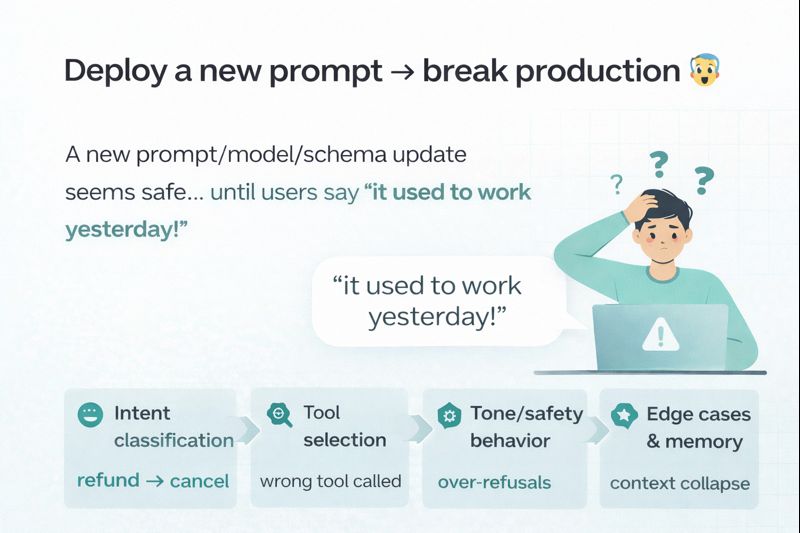
Why “prompt updates” break production
Shipping a new prompt (or tool policy) feels harmless until customers start reporting “it used to work yesterday.”
That’s because even small changes can shift:
- intent classification (“refund” → “cancel”)
- tool selection (wrong API/tool called)
- tone/safety behavior (over-refusals or oversharing)
- edge-case handling (multi-turn context collapses)
If your assistant is used in sales, support, or voice calls, regressions aren’t just annoying they directly cost revenue and trust.
What “regression testing” means for AI assistants
In classic software, regression testing checks that new code doesn’t break old behavior.
For AI agents, the same principle applies but your “code” is a mix of:
- system prompt + developer instructions
- tools + schemas + policies
- memory rules + retrieval context
- model changes (and provider updates)
So the only reliable approach is to turn expected behavior into repeatable test cases, run them on every change, and track drift.
The minimal workflow that actually works (for founders and teams)
You don’t need a massive QA team. You need a repeatable loop:
- Create a test suite
Start with 25–100 real questions users ask (including edge cases). - Run the suite on every prompt change
Same inputs → capture outputs. - Score outputs automatically
Use semantic scoring + rubric checks (did it call the right tool? did it ask the right follow-up?). - Highlight regressions
Compare “before” vs “after” and flag what got worse. - Approve or rollback
Ship only if the suite passes your threshold.
This is the difference between “we hope it’s better” and we can prove it’s better.
What to test (the 8 categories that catch 80% of failures)
If you’re starting from zero, prioritize these:
- Core user intents (top 10 questions)
- Tool calls (correct tool + correct arguments)
- Policy compliance (safety + privacy)
- Refusals & escalation (handoff rules)
- Multi-turn memory (context consistency)
- RAG grounding (answers match docs)
- Error handling (API down, missing data, timeouts)
- Tone & brand voice (especially for sales/support)
A simple scoring rubric (copy/paste)
When you review outputs, rate each test on:
- Correctness (0–5): did it answer the actual question?
- Actionability (0–5): did it provide next steps or ask for missing info?
- Tooling accuracy (0–5): right tool, right payload, no hallucinated actions
- Safety & privacy (0–5): no leaks, compliant behavior
Then define a pass rule, for example:
- Must pass: tooling accuracy + safety
- Target average: ≥ 16/20 overall
- No critical regressions: on core intents
Common mistake: “manual UAT spreadsheets”
Most teams start with a Google Sheet of test questions and do manual checks.
The problem is: manual checking doesn’t scale and people get inconsistent.
The upgrade is simple:
- keep the spreadsheet as the source of truth
- turn it into an executable test suite
- automatically capture outputs, scores, diffs, and regression flags
How EvalVista helps (short and non-salesy)
EvalVista is an automated test harness for AI assistants (including VAPI and Retell).
It turns your UAT spreadsheet into an executable suite, records every response, scores them semantically, and highlights regressions before you deploy a new version.
Quick checklist before you ship any prompt update
- I ran the full test suite on the new version
- Tool calls still behave correctly
- No safety/privacy regressions
- Core intents improved or stayed stable
- Any failures are either fixed or explicitly accepted
Want a starter evaluation template? Send us a message and we’ll share a spreadsheet format you can use to bootstrap your first test suite.
